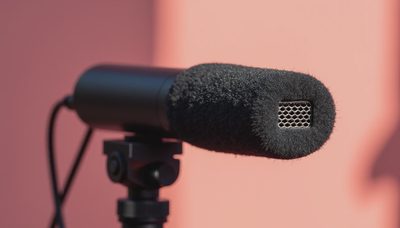
The Canon DM-E1D stereo microphone is the sort of accessory that looks simple until you compare it with the audio your camera records on its own. I have spent enough time evaluating imaging hardware to know that a specification only matters when it solves a problem in the field. Here, the problem is usually thin, distant, or distracting sound from a camera-mounted microphone. The DM-E1D aims to give compatible Canon cameras cleaner, more directional audio without adding a separate recorder and cable to your setup.
What the Canon DM-E1D stereo microphone is designed to do
This is a camera-mounted digital microphone built for Canon cameras equipped with the company's Multi-function shoe. Rather than relying on a traditional analog 3.5mm cable, it can communicate through the shoe on compatible bodies. That makes the installation tidy: slide it into place, lock it, and configure the camera's audio settings.
The word stereo matters. A stereo microphone uses more than one audio channel to preserve some sense of left-to-right space. That can make a walking tour, product demonstration, or outdoor scene feel less flat than mono speech. It does not turn a small camera into a film soundstage, though. A microphone mounted above the lens is still several feet from a speaker in many real situations, and distance remains the enemy of clear dialogue.
The Canon DM-E1D stereo microphone is best understood as an upgrade to convenience and camera-top sound, not a universal replacement for a lavalier microphone or a boom operator. If your subject is speaking directly to camera from a modest distance, it can be a sensible improvement. If the person is moving through traffic or standing across a room, placement will matter more than the brand name on the microphone.
Pickup patterns and what they mean in practice
The microphone offers selectable pickup approaches intended for different recording situations. In plain English, a pickup pattern describes which directions the microphone hears most strongly. A narrower setting emphasizes sound in front of the camera, while wider stereo settings capture more of the surrounding scene.
For a seated presenter facing the lens, a forward-focused setting is usually the logical starting point. It can reduce some side noise, although it cannot erase a refrigerator, air conditioner, or passing motorcycle. For a museum walk-through or travel sequence, a wider setting can preserve the sense of the room. You will hear more ambience, footsteps, and reflections, which is often exactly what makes location footage feel alive.
The Canon DM-E1D stereo microphone is also useful when you want to record a scene rather than only a voice. Imagine filming waves along a beach path or a small acoustic performance from the back of a room. Stereo information can give the finished clip a little more width. Just keep expectations realistic: the microphone's position follows the camera, so panning changes the relationship between the recorded sound and the image.
Compatibility deserves more attention than the product photos
The most important buying question is not whether the microphone fits a Canon camera physically. It is whether your specific body supports the Multi-function shoe features required for this digital accessory. Canon's compatible-camera lists and firmware notes should be treated as part of the purchase, not as fine print you read afterward.
This is especially important because Canon sells bodies with different hot-shoe designs and audio capabilities. A camera can have a shoe and still lack the digital communication needed by this accessory. On a supported body, you should be able to manage relevant audio settings through the camera interface. On an unsupported body, the microphone may not deliver the result you expect, even if it appears to mount correctly.
Before ordering, identify your exact camera model, check Canon's current compatibility information, and confirm whether the camera needs a firmware update. Also check whether the shoe is occupied by a cage, handle, or other accessory. A compact rig can become awkward when a top-mounted microphone competes for the same space as a monitor or carry handle.
Setup for cleaner audio
Start with the camera and microphone powered off. Attach the microphone firmly, then turn on the camera and select the appropriate audio mode. Record a short test clip while speaking at the same distance and volume you will use for the real shot. Listen with headphones if your camera supports monitoring; the rear screen cannot tell you whether a cable is loose or a refrigerator is humming.
Set levels conservatively. Digital clipping, which happens when a signal exceeds the camera's recording range, produces harsh distortion that is difficult to repair. A quieter recording with clean peaks is usually safer than one that is pushed too high. Leave a little headroom for laughter, emphasis, or an unexpected loud sound.
With the Canon DM-E1D stereo microphone, wind protection is another practical concern. The small foam screen included with many camera microphones helps with light air movement, but outdoor shooting often calls for a furry wind cover designed for the microphone. Wind rumble can overwhelm speech even on an otherwise calm day. Face the camera away from strong gusts when possible, and place the subject closer rather than simply raising the recording level.
Where it fits in a real kit
For quick editorial clips, family travel footage, behind-the-scenes work, and product videos, this kind of microphone is appealing because it reduces setup time. You do not need to attach a receiver to the subject, hide a lavalier cable, or synchronize a separate audio file after every take. That simplicity has value, particularly when you are filming alone.
A wireless lavalier system remains the stronger choice when dialogue is the priority and the subject is more than a few feet away. A small shotgun microphone on a boom can sound better because it can be placed closer to the speaker. A handheld recorder can offer useful controls and backup options, but it also creates another battery, memory card, and file to manage.
That is the tradeoff with the Canon DM-E1D stereo microphone. It is less intrusive than a boom, easier to carry than a full wireless kit, and more consistent than depending on the camera's built-in microphones. In exchange, it cannot defeat distance or a noisy location. I would choose it for fast, camera-centered work rather than for a carefully staged interview.
Is the Canon DM-E1D worth buying?
The answer depends on what you are trying to fix. If your compatible Canon camera produces weak audio in casual video, and you want a clean top-mounted solution, the microphone makes practical sense. It is particularly attractive when the digital shoe connection keeps the setup uncluttered and you value quick operation over elaborate sound design.
I would not buy it simply because every camera deserves an accessory microphone. If your main work is close-up dialogue, spend first on microphone placement, monitoring, and wind control. A less expensive microphone positioned near the speaker can outperform a more polished camera-top solution positioned too far away.
The Canon DM-E1D stereo microphone earns its place when convenience, compatibility, and a modest improvement in location sound align. Test it before an important shoot, learn what each pickup pattern captures, and listen critically rather than trusting a product label. The best camera is the one you understand, and the same is true of the audio attached to it.